
We want you and your money safe! Here are some ways to protect yourself.
Stay informed of the latest Scams
Fraudulent QR codes are the latest attempt by scammers to steal your information, so stay alert!
How do they do it?
Scammers are making fake QR codes and placing them where legitimate QR codes already exist. Areas to be cautious are parking meters, information boards, and advertisement posters. They will affix their fake QR codes over real ones. Once a person scans the fake QR code, they are directed to a phony site that will mimic the real one.
Members should also be wary of unsolicited emails, and physical mail. They may claim to be well-known retailers offering to good to be true deals, special offers or failed transactions that need your attention immediately.
And let’s not forget social media. Hackers can take over one of your family’s or friend’s accounts and send messages containing QR codes, trying to convince you to scan them. They could claim it is a funny link or perhaps something holiday oriented. But remain cautious.
How do we combat this?
If you’re scanning a QR code in public, take a moment and look at it. Does it look like a sticker that was just placed over another QR code? Does it match the design or artwork associated with it? If you do scan it, does the site look legit? Are there a lot of grammatical errors? Is it asking you for personal information?
If you receive an email or mail, ask yourself a few questions. Was it expected? Does it seem too good to be true? Try contacting the sender directly, and not on the contact information they have provided.
If someone you haven’t spoken to in a while suddenly contacts you on social media asking you to scan a QR code, don't do it. If it is a friend or family, contact them directly. They may have been hacked and not even know it.
Phishing: These unauthorized emails that request sensitive information, offer "too good to be true" deals or opportunities are red flags. They often take the form of a message from a financial institution or recognizable company or brand asking you to provide account information, perform a task or send them personal information for an opportunity to earn more. These scams are often disguised as simple requests due to a computer error, or as part of a system upgrade or even an enhanced Internet security initiative. Sometimes they are worded to cause concern over access to your account, for example, “your account/credit card has been suspended.”
These fraudulent emails often contain links to a website that may look real but is not. The information requested may include account numbers, usernames, access codes and passwords. Do not enter your account information if you reach such a site.
Vishing calls: Account holders receive an automated or live phone call from a blocked source or unknown number stating that their card has been blocked, or offering a lower interest rate. Account holders are then asked to provide or enter their full card number and PIN or CV2 (security code on the back of your card) information to reactivate their card or lower their rate. Sometimes, if the calls go unanswered, a voicemail message is left instructing the account holder to contact a number to reactivate their account.
Text Smishing messages: Text messages (or SMS messages) referencing compromised cards, "too good to be true" deals/opportunities or suspended accounts are typical. A number or response request e.g. (reply YES if interested) is provided within the text (SMS) message for reactivation or acceptance. Most messages do not reference a particular financial institution name.
FAST will never call you to ask for your card number or personal data. If you receive a phishing email, text or call please delete the email or text message and do not click on any links.
If you have entered information about one of your FAST Credit Union accounts on a suspicious site, text message or phone call, please call our Member Center immediately at (559) 584-0922 so we can help you take the necessary precautions to protect your accounts.
Be assured that FAST's systems remain secure and are not the cause of these incidents. Often, the perpetrators of these fraud attempts target multiple financial institutions with the hopes of tricking Members into sharing their sensitive data.
We are committed to educating Members on how to avoid becoming victims of these types of scams.
FAST members may be contacted by a FAST representative in the event of suspicious activity on their account.
REMEMBER: FAST will never call you to ask for any log in credentials, passcodes, card number or expiration date.
Examples of text and email scams:
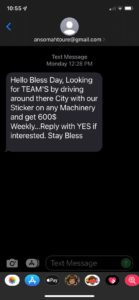

The Zelle / P2P fraud scam is widespread and has been making local and national news as the social engineering tactics used by fraudsters in this scam continue to evolve. A newer version of the scam has fraudsters, impersonating a Zelle user’s financial institution, conning the user into using Zelle to transfer funds to themselves using their mobile phone number under the guise that it will replace funds stolen from their account. However, the Zelle transfers go to the fraudsters.
Details
The Zelle / P2P fraud scam continues to result in large fraud losses for credit unions. Fraudsters continue to target members of credit unions; however, they’ve adapted to a newer version of the scam that has made headlines across the country.
Here’s How It Works:
• Fraudsters send text alerts to users – appearing to come from their financial institution – asking the users if they attempted a large dollar Zelle transfer.
• Fraudsters immediately call the users who respond ‘NO’ by spoofing the FI’s phone number and claim to be from the FI’s fraud department.
• Fraudsters tell the users the Zelle transfers went through, but the funds can be recovered.
Fraudsters tell the users in order to recover the stolen funds they must use Zelle to transfer the funds to themselves using the user's mobile phone number, but before doing so, the fraudsters instruct the users to disable their mobile phone number associated with their Zelle account.
Note: Fraudsters may have previously opened an account at the user’s FI (likely using a stolen identity) and establishes Zelle through the online or mobile banking channel linking the member’s mobile phone number to Zelle.
• When the fraudster links the user’s mobile phone number to the fraudster’s Zelle account, a 2-factor authentication passcode is generated and sent to validate the mobile phone number. The text message containing the passcode is actually sent to the user’s mobile phone; however, the fraudster cons the user into providing the passcode over the phone. (The text containing the passcode has the FI’s name which explains why fraudsters open a fraudulent account at the user’s institution.)
• The fraudster enters the passcode to activate the mobile phone number on their Zelle account.
• Users are instructed to Zelle themselves the funds.
The Zelle transfers actually go to the fraudsters.
Fraud Prevention Tips for Zelle
• Do not provide sensitive information to callers claiming to be from FAST. FAST will never ask for sensitive information such as Online Banking usernames, passwords or 6-digit multi-factor authentication codes when calling.
• A Zelle notification text from FAST will not ask for a Yes/No response.
• If you suspect you have been a victim of fraud, call FAST at 559-584-0922
If you received an unexpected check in the mail, it is a good idea to research it thoroughly before deciding to accept it. This is usually the first step in a fraud scam. Here are some ways to investigate it:
- Did the check come with a letter? If so, read the letter carefully. Does it contain instructions? Many fraud scams start with a letter and a check. The letter will have instructions to send money or purchase a money order. Do an Internet search to find out if other people have received letters for the same purpose.
- Look up the business that issued the check on the Internet. You’ll find the name of the business in the top left-hand corner of the check. If you find a listing online, call the business and ask them if they issued the check. Do not call the phone number provided on the check or in the letter as it could lead back to the fraudster.
- If you have trouble finding any information, take the check to the financial institution on which it is drawn. They will be able to verify if the check is legitimate.
- If you have concerns that the check you received may be a scam, bring the check and the accompanying letter to FAST so we can further investigate. You may also give us a call at (559) 584-0922 to discuss this with a member service representative.
Following these steps will help protect you from falling victim to a fraudulent check scam. If you deposit a fraudulent check into your account and spend the money (or send it to someone else), you will be held responsible for the dollar amount if the check bounces. This may result in a negative balance in your account. Even if the funds are made available to you, there is no guarantee that the check is legitimate.
Tips to keep your account/information Safe
FAST Protect
FAST Protect puts you in control of your FAST Debit and Credit Card through your mobile device, making it easy to set alerts, guard against fraud, monitor spending habits and so much more.
Visit our FAST Protect webpage to learn more.
How to keep your Online Banking Account secure
- To ensure the security of your accounts, it is very important that you do not give your online banking login information to anyone.
- Create a strong password. Using a combination of special characters, numbers, lowercase and uppercase letters increases the security of your password.
- Pay attention to security alerts that inform you about possible data breaches. It is a good idea to change your password if you have reason to believe that your information has been compromised.
- It is important to keep your antivirus software up to date. The technology environment is constantly changing and antivirus software can quickly become obsolete.
- Use different passwords for each of your accounts, including email, website logins, social media, etc. If one website gets hacked, your credentials are still safe across all of your other accounts.
If you have reason to believe that your online banking credentials have been compromised, change your password immediately. If you have concerns, call (559) 584-0922 and a Member Center Representative can assist you.
Never click on a link in an email or text message without doing this first.
Prior to clicking on a link in an email, you should hover over the link to determine the true address. If the address is a jumble of numbers and letters, it could be malware. On a smart phone, it is more difficult to determine the true address. Be very careful to not click on a link unless it is from a known and trusted source. If you have clicked on a link, and you’ve determined it to be an attempt to get your personal information, you should immediately shut down your device and take it to a professional to determine if malware has been added.
If you suspect your account has been compromised. Call (559) 584-0922 to speak to a Member Center Representative immediately.
- FAST will never call, text or email you asking for your account information, passcode, or password.
- FAST will not send text alerts prompting you to disclose account information.
- FAST will not ask you to attempt a Zelle transfer for any reason.
- FAST will not ask you to purchase gift cards for any reason.
- Never disclose your 2-step verification passcode to anyone.
When in doubt, always reach out to FAST at (559) 584-0922 to confirm any phone call, email or text message.
Security Tips for Shopping
There are hundreds of shopping apps out there. Some of these apps may be malicious, so only use apps that you know and trust. When you download software or apps, be sure to download from verified sources such as the App Store or Google Play. You can verify that an app is legitimate by reading the app’s reviews, checking the number of app downloads, and looking up the app’s developer.
A common tactic among cybercriminals is to create phony email notifications from a retailer or postal service. These notifications often include a malicious attachment. The cybercriminals may claim that there was an update to your order or that your package has been delayed, but you’ll have to download the attachment to find out more. Don’t fall for this trick! Before you open the attachment, contact the retailer or postal service to verify that the notification is legitimate. You can also look up your order directly on the website where you made the purchase.
Watch out for malicious advertisements, otherwise known as malvertising. Malvertising is when cybercriminals use ads to spread malware or to trick users into providing sensitive information. When online shopping, only click on an ad or link from a reputable source, such as a retailer’s official social media profile. To be extra careful, use your browser to navigate to the store’s official website to shop instead.
Security Tips for Travel
FAST Protect puts you in control of your FAST Debit and Credit cards through your mobile device, making it easy to set alerts, manage travel dates and your finances on the go.
Click the link below to learn more about this amazing app!
Online Education Center || FAST Federal Credit Union (onlinebanktours.com)
Never leave your phone, tablet, or computer unattended. Try to take your device with you wherever you go. If you do need to step away, lock your device. Then, ask a trusted friend or family member to keep your device safe while you’re gone.
Use strong passwords for all your devices, apps, and services! Don’t forget to include the apps and services that you only use while traveling, such as hotel websites and translation apps. For added security, many apps allow you to use biometric identifiers instead of a password. If your device has a fingerprint scanner or facial recognition, set up this feature before leaving on your trip.
If you need to work while traveling, make sure to use a Virtual Private Network, or VPN. VPNs create a private network and encrypt your internet activity to protect your information from cybercriminals. Using a VPN is especially important if you connect to a network in a public place, such as a coffee shop or airport.
Always disable the option to automatically connect to Wi-Fi networks on your phone, tablet, or computer. Instead, manually choose which network you’d like to join. Only use Wi-Fi networks that you know are safe, and never connect to random hotspots.
Frequently Asked Questions
Immediately call (559) 584-0922 to speak to a FAST Representative.
If calling after-hours, select Option #1 for FAST Debit Card, Option #3 for Credit card or Option #5 to speak to an After-hours Superhero.
Immediately call (559) 584-0922 to speak to a Member Center Representative.
If calling after-hours, select option #1 for Debit Card or option #3 for Credit Card to speak to an After-hours Specialist.
ID Theft Prevention

Shred, Shred, Shred
Bring 1 square foot of personal information to any branch, up to 4 times per year. We'll shred it for you!

FASTProtect
FAST Protect puts you in control of your FAST Debit and Credit cards through your mobile device.
Credit Reports
Annually review your credit reports for free to ensure your information is accurate.
Be safe and help prevent Identity Theft by placing a credit freeze. This will prevent identity thieves from opening new accounts in your name.



Additional Help
Helpful information about Identity Theft
National Registery to limit telemarketing calls
Opt out of credit or insurance offers.
Remove email and/or home addresses from marketing lists
212-768-7277 ext. 1888
